At a Glance
Segtax needed to automate the extraction of line items from Settlement Statement PDFs—a task that was taking 30 minutes per document. By combining OCR (Optical Character Recognition) with ChatGPT’s structured outputs, we built an AI pipeline that:
- Reduced document processing time from 30 minutes to 5 minutes (6x improvement)
- Shifted from sequential and manual to simultaneous and automatic document processing
- Achieved 70-100% categorization accuracy depending on document complexity
- Freed domain experts from manual data entry to focus on review and validation
This case study shows how modern AI can transform document processing workflows, even with inconsistent PDF formats and varying quality.
Table of Contents
- The Domain: Saving Money on Taxes by Real Estate Itemization
- The Problem: Not Everything is Automated (yet)
- The Opportunity: “There’s Data In Them There PDFs”
- Pre-Processing: Extracting Text from the PDF
- The Prompt: Identifying Line Items from Extracted Text
- Turning Extracted Text into Structured Output
- Actually Using the Structured Output
- The Humans in the Loop
- Wiring It Up
- The Efficiency Gain
- Monitoring Pipeline Accuracy and Efficiency
- The Takeaways
The Domain: Saving Money On Taxes By Real Estate Itemization
I had the pleasure of working with Segtax, a very cool startup that is modernizing the way cost segregation studies are done. Over the course of several weeks, I worked with their engineering team and domain experts to build an AI-powered document extraction pipeline.
What’s a cost-segregation study? Well, it’s a little complicated, but for our purposes, we can think of it this way:
By itemizing the things that make up a piece of real estate (ex: cabinetry, flooring, electrical wiring), we can save the owner of that property money on their taxes. The output of this, the cost segregation study, is a report of these itemizations that gets submitted to the IRS.
Traditional cost segregation studies are done manually and are thus costly to produce, both in time and money.
Instead, by automating crucial aspects of the cost segregation process, Segtax makes it cheaper, faster and more attainable.
But in order to do this, many documents of all shapes, sizes and purposes must be reviewed, processed and synthesized. This all happens internally with Segtax’s proprietary software. The output of all of this magic is the Cost Segregation Study PDF that is delivered to the customer.
The Problem: Not Everything is Automated (yet)
This is where we come in.
One of the documents that needs to be processed is the Settlement Statement.
What’s a Settlement Statement? Think of it as the itemized receipt for a real estate purchase—showing every fee, tax, credit, and charge that changed hands during closing. It’s typically 3-15 pages of line items that need to be categorized for tax purposes.
These settlement statements are made up of line items which represent things like taxes owed, credits due or fees paid. Different categories of line items impact the cost segregation study in different ways.
The problem is that these documents are still being read with slow human eyes and interpreted by distractable human brains.
Our mission, should we choose to accept it:
The Mission
Whenever a Settlement Statement is uploaded to the system, extract, categorize and persist the line items within it—automatically.
The Opportunity: “There’s Data In Them There PDFs”
If we can dig the line items out of the Settlement Statement PDFs and process them into something the Segtax system can use automatically, then we’re golden.
Now that we know what a cost segregation study is and how the line items within a settlement statement are used within one, we can start planning our line item extraction.
For this automation, we’ll need a few things.
What We Need
- Something to extract the text of the settlement statement PDF
- Something to identify the line items from the extracted text
- Something to categorize the extracted line items
Note: Because modern AI providers like ChatGPT also include OCR capabilities, in some cases, all 3 steps above could be combined into 1. However, if the PDF we are extracting data from was scanned in manually from a physical document and / or the quality was lacking, these AI tools with built-in OCR would often be unable to process it.
By owning the text extraction step ourselves, we can process all documents while gaining more control and insight into the extraction process.
The only downside to this trade-off is the engineering lift, but as you’ll see, it’s relatively negligible.
Pre-Processing: Extracting Text from the PDF
To extract text from any Settlement Statement we throw at our automation, we use Apache PDFbox and tesseract.
These two libraries handle extracting text in two different ways.
PDFBox extracts “native” text directly from the PDF file itself.
However, native text is often not available, like in the case of manually uploaded, crooked or blurry physical documents. For these PDFs, we fall back to tesseract, which uses nifty machine learning to extract text from the scanned images that comprise the PDF.
So, in practice, to extract the text, we first check if we can extract the text natively and if we can’t, we then fall back to OCR.
The Prompt: Identifying Line Items from Extracted Text
This is difficult because the Settlement Statements themselves are not normalized in structure, as you can see in the below examples.


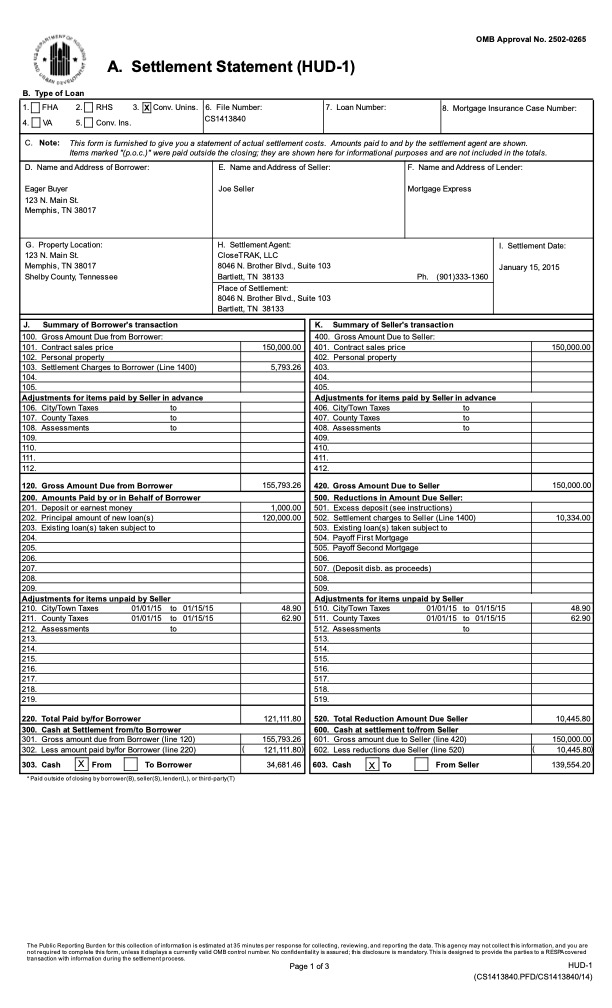
To remedy this, we use prompting to tell the LLM what we can expect from the text.
Something like …
The document displays both buyer and seller debits and credits as columns, and the extracted text should reflect this
While prompting the LLM in this way with the raw, extracted text is certainly not as accurate as something like using custom bounding box identification to categorize the text within the PDF before extraction, it does have the benefit of working consistently every time because we are less reliant on said PDF pre-processing step.
For example, in order for bounding box identification to work effectively, we need a few things:
-
The ability to know beforehand all potential configurations of the bounding boxes that may exist on any given uploaded settlement statement.
Ex: configuration A may have Seller on the right, configuration B has seller on the left and configuration C may have no seller, buyer only
-
The appetite to find and codify said configurations.
-
A certain level of consistency in the image quality of the PDFs being uploaded.
-
Some mechanism to ensure consistency between the raw text extractions and the bounding box guided extractions
#1 and #4 would prove difficult to solve.
#3 might actually be impossible, considering the documents are customer provided.
And for #2…well, for this proof of concept, I prioritized a working solution over premature optimization. Bounding box preprocessing could be added later if extraction volume justified the additional complexity.
Thus, since in practice, we only fall back to OCR text extraction around half the time, the pre-processing bounding box step was backlogged in favor of prioritizing a working proof of concept.
Turning Extracted Text into Structured Output
ChatGPT’s structured outputs is a feature in the OpenAI SDK that forces ChatGPT to return data in a specific, predefined format, like a JSON object—essentially a structured data format—ensuring it conforms to a developer-supplied schema for reliable integration into applications, eliminating the need for manual parsing and retries.
Again, in our case, we want to extract line items representing the closing costs of the real estate we are executing a cost segregation study. Let’s call them LineItemExtractions
Segtax has a Spring backend written in Kotlin, so our LineItemExtraction class is a Kotlin class. Here’s a simplified version of our data structure:
data class LineItemExtraction(
    @JsonPropertyDescription("The text of the line item as it appears on the settlement statement")
    val raw_text: String,

    @JsonPropertyDescription("The amount of the line item")
    val amount: BigDecimal,

    @JsonPropertyDescription("'seller' or 'buyer'")
    val debitTo: String?,

    @JsonPropertyDescription("'seller' or 'buyer'")
    val creditTo: String?,

    @JsonPropertyDescription("The category of this line item")
    val category: ClosingCostCategory,

    @JsonPropertyDescription("On a scale of 1 to 10, how confident you, the LLM, are in the accuracy of this line item")
    val confidence: BigDecimal,
    // ... additional fields for tax basis calculations
)
The key insight: we annotate each property with @JsonPropertyDescription to guide ChatGPT. These descriptions are what the LLM uses to understand what each field should contain.
These descriptions are critical—tweaking them directly impacts how ChatGPT interprets the extracted text. Why does this matter? Because slight changes to these descriptions can shift categorization accuracy by 10-20 percentage points—which directly impacts how much manual review is needed.
Actually Using the Structured Output
You may have noticed a property ClosingCostCategory above.
That’s what we’re really after. Extracting the text and mapping it to a JSON object consistently only gets us halfway to value-town.
Now, we’re going to put ChatGPT’s big ole brain to work, and ask it to reason about the line items it just extracted.
Remember, before our automation, these line items were being categorized manually by users in Segtax’s application.
This is where the probabilistic world of LLM reasoning meets the deterministic world of application logic. This enum is where our automation effectively crosses the rubicon.
Thus, by defining the following (simplified) ClosingCostCategory enum, we tell ChatGPT to use these and only these enum values when categorizing a LineItemExtraction.
enum class ClosingCostCategory {
    PURCHASE_PRICE,
    LEGAL_FEES_AND_TITLE_FEES,
    RECORDING_FEES,
    TRANSFER_TAXES,
    TITLE_INSURANCE,
    ACQUISITION_FEES,
    // ... 15+ other categories
}
Now, when ChatGPT responds with a LineItem extracted from the text we provided, we can safely assume that it has been given a valid categorization.
These categorizations are what key off deterministic flows downstream in the Segtax application and impact the cost-segregation study directly. Important!
Because each category triggers different tax basis calculations downstream, getting ChatGPT to reliably categorize into the correct enum value means the difference between automated processing and manual correction. This is where the business value lives.
Let’s recap:
Now you know how we extract text from the PDF,
graph TD
    Start[Segtax Application] -->|User Uploads| A[Settlement Statement PDF]

    A --> B{Text Extraction Method}
    B -->|Native Text Available| C[PDFBox]
    B -->|Scanned/Low Quality| D[Tesseract OCR]
    C --> E[Extracted Text]
    D --> E

    E --> F[Prompt: Extracted Text +  IRS Guidance]
    F --> G[ChatGPT LLM]
    G --> H[Structured Output]
    H --> I[Categorized LineItemExtraction Objects]

    I -->|Return Results| End[Segtax Application]

    style Start fill:#fce4ec
    style A fill:#e1f5ff
    style E fill:#fff4e1
    style G fill:#e8f5e9
    style I fill:#f3e5f5
    style End fill:#fce4ec
The Humans in the Loop
When designing a system like this, it’s crucial to get the domain expert’s feedback early and often. To do this, I used Anthropic’s Claude to generate static html pages that displayed the PDF on one side and the extracted line items on the other.
This way, with each run of the extraction pipeline, I could bother the domain expert in various ways and ask them to review the categorizations made for the extracted line items, just by sending them an html file to open in their browser.
This was much easier than setting the automation up to run on their machine or having them toggle between Preview and a JSON blob.
However, I found it easy to get bogged down in this step, as it was hard to define a stopping point for all of the tinkering it begets.
After much tweaking of the various knobs at our disposal — the prompt verbiage, the ChatGPT model, the shape of the structured output and the description of properties within its classes — we eventually settled on a prompt, a model and LineItemExtraction.kt file.
This iterative refinement phase was the most time-intensive part of the project—but also the most valuable.
If I could go back, I would go into this step with more of a plan. I would have defined some metrics to shoot for, and I would have defined the problem space explicitly with the domain experts before asking them to start reviewing first passes.
Wiring It Up
Now, when an internal Segtax user uploads a Settlement Statement as part of conducting a cost segregation study, we kick off an extraction pipeline that:
- Reads the PDF
- Extracts the Line Items from the PDF
- Categorizes the Line Items in the PDF into one of several predefined categories
But what to do with this newly extracted and categorized data?
Well…now we can use it!
Inside our Spring application, with Controller, Service, Repository classes and async Task handling logic for our newly extracted data, we can now fully integrate the output of our automatic, AI-powered Settlement Statement processing into our backend.
Now, in the UI, the possibilities are limited only by the imagination of the product designer.
For our use case, after the line items were extracted from a document, we then presented the results to the user in the UI as an editable list of line items alongside the PDF.
In this way, we ensure the human closes the loop and ultimately remains responsible for the data stored.
The Efficiency Gain
Categorizing each line item in a Settlement Statement is something that would take, on average, roughly 30 minutes per document. Now, it’s a background task that completes in roughly 5.
The Results
⏱️ 6x faster processing: 30 minutes → 5 minutes ✓ 70-100% accuracy on categorization (document complexity dependent) 📊 100% accuracy on text extraction and numeric values
While it’s tempting to say that you get 25-30 minutes back per document, the reality is that it still takes time to review and update.
Depending on the complexity of the Settlement Statement, my testing with the domain experts found the categorizations of the line items to be anywhere from 70-100% accurate depending on the complexity of the Settlement Statement.
Extractions that didn’t require any reasoning, like the text of a line item description or the number associated with it, was essentially 100%.
That means that after a user uploads a Settlement Statement, all that is left for a user to do is to review data rather than read, interpret, and input it.
Monitoring Pipeline Accuracy and Efficiency
Not only do we store the entity data in our database — as in, the data that gets updated by a user and used by the application — but we also store the extraction data — a snapshot of the original LLM extraction.
Now, we can test out different models to see how they perform, or simply run audits of models in the wild.
By maintaining a history of all good and bad extractions, we continuously improve our pipeline over time by auditing the data and iterating the inputs to our automation.
The Takeaways
1. AI + Human Expertise Beats Pure Automation
The most successful AI implementations don’t replace humans—they augment them. Our pipeline handles the tedious extraction and makes a first pass at categorization, but domain experts review and validate. This hybrid approach builds trust while dramatically improving efficiency.
2. Iterative Development With Domain Experts is Essential
We didn’t nail the extraction on the first try. Getting static HTML review pages in front of Segtax’s team early and often was crucial. Their feedback shaped our prompts, structured outputs, and confidence thresholds. The hardest part wasn’t the code—it was defining “good enough” with the people who understand the domain.
3. Document Extraction Has Massive ROI Potential
If your business processes unstructured PDFs, invoices, receipts, or forms—there’s probably an automation opportunity. Modern AI can handle inconsistent formats, varying quality, and complex categorization logic that would have required brittle rule-based systems just a few years ago.
4. Store Both the Extraction and the Entity Data
By maintaining a history of original LLM extractions alongside user-corrected data, we created a feedback loop for continuous improvement. We can audit model performance, test new models against real data, and prove accuracy improvements over time.
Looking to automate your document workflows? Whether it’s invoices, contracts, forms, or PDFs, the techniques we used for Segtax can be adapted to your domain. The technology is ready—the question is where it can drive the most value in your business.
Want to discuss how AI automation could work for your business? I’d be happy to explore opportunities for document processing, data extraction, or other AI-powered workflows. Get in touch to start the conversation.